
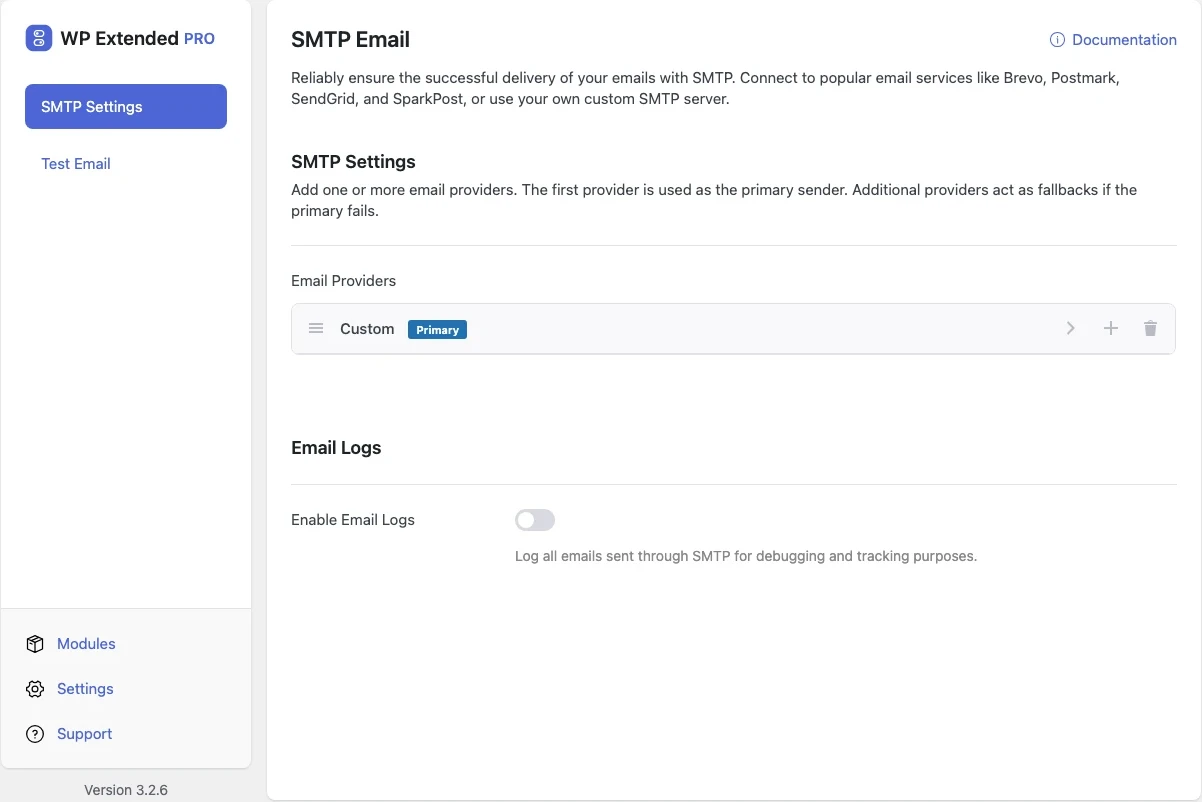
Stop WordPress emails going to spam
Send password resets, form notifications and order emails through Brevo, Postmark, SendGrid, SparkPost, Emailit, toSend or your own SMTP server. Add a second provider as a fallback, send a test, and stop guessing whether mail arrived.
Free on WordPress.org. Pro adds the extra options listed below.
- with extra Pro options
- Free
- settings to configure
- 15
- developer hooks
- 3
- updates since 2023
- 15

Why you need SMTP Email
By default WordPress sends mail with PHP’s mail() function from your web server. Many hosts restrict it, and messages that do leave often fail SPF and DKIM checks, so they land in spam or vanish.
The first sign is usually a client asking why nobody received the contact form, or a customer who never got their password reset.
What SMTP Email does
Seven ways to send
Connect Brevo, Postmark, SendGrid, SparkPost, Emailit or toSend with an API key, or any SMTP server with host, port, SSL/TLS and login.
Fallback providers
Add more than one provider. The first is the primary sender, and the next takes over if it fails.
Force the sender
Lock the From name and address so other plugins can’t send as wordpress@yourdomain.
Test before you trust it
Check a provider’s credentials from its own row, then send a test email through the provider you choose, straight from the settings screen.
- 01 Turn on SMTP Email under Developer Tools.
- 02 Choose a provider and paste its API key, or enter your SMTP host, port, encryption and login.
- 03 Set the From name and address, and switch on Force From Email if other plugins send mail.
- 04 Send a test email, then add a second provider as a fallback if you want one.
Free and Pro options
What you can set in the free plugin, and what WP Extended Pro adds.
In the free plugin Free
- From Name The sender name for emails sent through this provider.
- From Email The sender email address for this provider.
- Force From Email Always use the from email configured above, overriding any other plugin.
- Force Sender Name Always use the sender name configured above, overriding any other plugin.
- API Key Enter the API key from your email service provider.
- SMTP Host The host of the SMTP server.
- SMTP Port The port of the SMTP server.
- Encryption Select SSL for port 465 or TLS for port 587.
- Use Auto TLS TLS encryption is enabled by default but may cause issues on some servers.
- Username The username for the SMTP server.
- Password The password for the SMTP server.
- Send from The configured provider to send the test through.
- Send to The email address to send the test email to.
Added by Pro Pro
- Enable Email Logs Log all emails sent through SMTP for debugging and tracking purposes.
- Log Retention How long to keep email logs before automatically deleting them.
Pro options unlock on any Pro plan, from $29 a year.
Where SMTP Email helps

Contact forms that actually arrive
Route form notifications through a transactional provider so enquiries reach the inbox, not spam.

WooCommerce receipts
Order confirmations and password resets go out from a properly authenticated domain.

Agency client sites
Use the same provider setup on every client site, with a fallback for when an API key lapses.
SMTP Email vs WP Mail SMTP
WP Mail SMTP has 4M+ active installs on WordPress.org. If you only need this one job, that’s a fine choice. If the site also needs other modules on this list, it’s one less plugin to update.
- What SMTP Email covers
- Sending through the major transactional providers or any SMTP server, a fallback provider, forced sender details and a test email. Pro adds email logs with retention, download and clearing.
- When to choose the specialist plugin
- If you need a mailer that signs in with a Google or Microsoft account, or delivery reporting dashboards, a dedicated mail plugin goes further.
For developers
SMTP Email has 3 hooks for changing its behaviour per project, without editing the plugin.
All SMTP Email hooksadd_action( 'wpextended/smtp-email/email_fail', function () {
// Your code here
} );- smtp-email/email_fail
- smtp-email/email_sent
- smtp-email/email_success
“Turn on what you need, leave the rest off. Duplicate posts, SMTP, rollback, custom admin URL, code snippets… stuff I used to install four or five separate plugins for. Now it’s just one with one update to run and one UI to deal with.”
- v3.4.0 3 Nov 2026
- new
Check a provider’s credentials from the settings screen.
- new
Choose which provider sends the test email.
- fixed
The Download Logs and Clear Logs buttons.
- new
- v3.3.0 10 Sept 2026
- fixed
A duplicate charset in the Content-Type header corrupted accented characters in some mail clients.
- fixed
The Download Logs button did nothing.
- fixed
SMTP Email questions
SMTP Email documentationYes. Sending, providers, fallback and the test email are all in the free plugin. WP Extended Pro adds email logs.
Brevo, Postmark, SendGrid, SparkPost, Emailit and toSend through their APIs, plus any SMTP server, including Gmail, Microsoft 365 or your host’s mail server.
Add a second provider. The first one in the list sends your mail, and the next is used if the first fails.
Use port 587 with TLS for most providers, or port 465 with SSL. If TLS causes errors on your server, try switching off Use Auto TLS.
Run one mail plugin at a time. Both replace WordPress’s mailer, so having two active means only one wins. Switch SMTP Email on, send a test, then deactivate the other plugin.
Pairs well with
All Developer ToolsGet SMTP Email free
SMTP Email is in the free plugin on WordPress.org, alongside 34 other free modules you can switch on when you need them.
Pro from $29 a year · 14-day money-back guarantee