
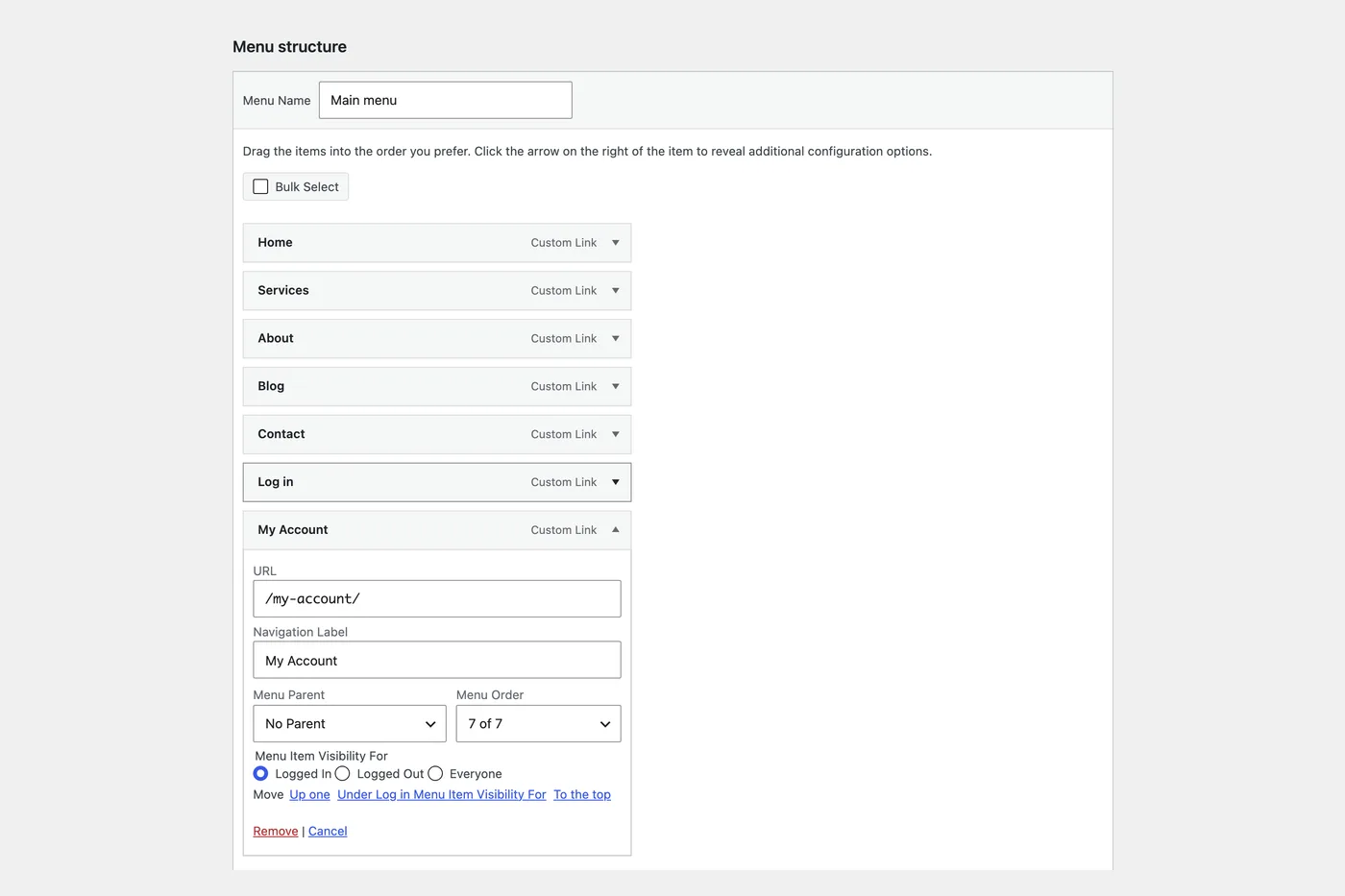
Show menu items only to logged-in or logged-out visitors
Set each navigation menu item to show for everyone, only logged-in visitors or only logged-out visitors.
Free on WordPress.org, with nothing locked behind Pro.
- in the free plugin
- Free
- last improved in
- 3.4.0
- Admin Tools modules
- 12

Why you need Menu Visibility
Sites with accounts need a Login link for visitors and an Account link for members. Without visibility rules, everyone sees both.
What Menu Visibility does
- Per menu item A visibility setting on every item in Appearance → Menus.
- Three choices Everyone, logged-in visitors only, or logged-out visitors only.
- 01 Turn on Menu Visibility under Admin Tools.
- 02 Open Appearance → Menus and expand an item.
- 03 Under Menu Item Visibility For, choose Logged In, Logged Out or Everyone, then save the menu.
Where Menu Visibility helps
Login and account links
Show Login to visitors and My Account to members.

Member-only sections
Hide links to areas a visitor can’t open anyway.
Menu Visibility vs Nav Menu Roles
Nav Menu Roles has 70k+ active installs on WordPress.org. If you only need this one job, that’s a fine choice. If the site also needs other modules on this list, it’s one less plugin to update.
- What Menu Visibility covers
- Showing each menu item to everyone, logged-in visitors or logged-out visitors.
- When to choose the specialist plugin
- If you need to show items to specific user roles, a dedicated plugin such as Nav Menu Roles does that.
- v3.4.0 3 Nov 2026
- improved
Visibility is now chosen from a dropdown, spaced to match WordPress’s own menu fields.
- fixed
The Move links on the Menus screen showed the visibility label instead of the menu item’s title.
- improved
Menu Visibility questions
Menu Visibility documentationYes. It is in the free plugin.
No. Menu Visibility works on whether a visitor is logged in or not. For admin pages, Menu Editor does control access by role.
No. It only hides the link. Protect the page itself with your membership plugin or page settings.
Duplicate Menu copies a navigation menu, and Menu Editor tidies the admin sidebar. See all three WordPress menu tools.
Get Menu Visibility free
Menu Visibility is in the free plugin on WordPress.org, alongside 34 other free modules you can switch on when you need them.
Pro from $29 a year · 14-day money-back guarantee