

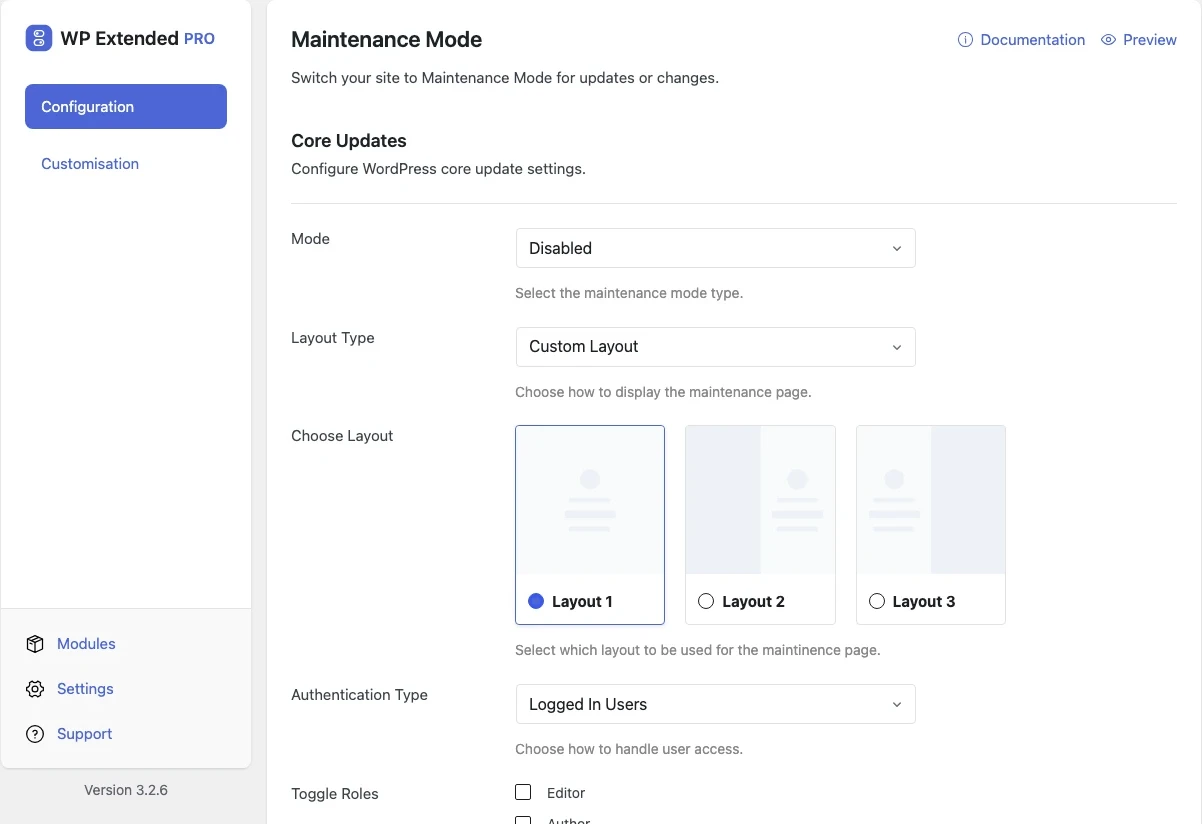
Put WordPress into maintenance mode or coming soon
Show visitors a branded holding page while you work. Anyone logged in still sees the live site, and Pro lets you choose between a 503 maintenance page and a 200 coming soon page.
Free on WordPress.org. Pro adds the extra options listed below.
- with extra Pro options
- Free
- settings to configure
- 14
- developer hooks
- 16
- updates since 2023
- 12

Why you need Maintenance Mode
Visitors shouldn’t see a half-finished redesign or a site mid-update. A blank or broken page also looks like an outage to search engines.
Maintenance pages need the right status code. A 503 tells Google to come back later, while a coming soon page for a new site should return 200.
What Maintenance Mode does
Branded page
Set the headline, body and footer text, each with its own colour, plus a logo, background colour and optional background image.
Live preview
See the page as you design it in the settings screen.
Maintenance or coming soon
Pro switches between Maintenance Mode (503) and Coming Soon (200), with a custom layout or an existing page.
Choose who gets in
Logged-in users see the live site. Pro can limit that to chosen roles, and lets set roles toggle maintenance from the admin bar.
Set it up
In WordPress, open WP Extended and find Maintenance Mode under Performance & Control.
Full setup guide- 01 Turn on Maintenance Mode under Performance & Control.
- 02 Add your logo, headline and message, and check the preview.
- 03 With Pro, choose maintenance or coming soon and who can see the site.
- 04 Switch it off when you’re done. You see the live site throughout while logged in.
Free and Pro options
What you can set in the free plugin, and what WP Extended Pro adds.
In the free plugin Free
- Headline Text Enter the page headline in to the field provided.
- Headline colour Choose headline colour.
- Body Text Enter the body text in to the field provided.
- Body colour Choose body colour.
- Footer Text Enter the page footer text in to the field provided.
- Footer colour Choose footer colour.
- Select Logo Select a logo image for the maintenance page.
- Background Colour Choose the base background colour for the maintenance page.
- Enable Background Image Add an optional background image overlay.
- Background Image Select a background image to overlay on the background colour.
Added by Pro Pro
- Mode Select the maintenance mode type.
- Layout Type Choose how to display the maintenance page.
- Authentication Type Choose how to handle user access.
- Toggle Roles Select which roles can toggle maintenance mode on/off from the admin bar. Administrators can always toggle.
Pro options unlock on any Pro plan, from $29 a year.
Where Maintenance Mode helps

Launch countdowns
Show a coming soon page while a new site is being built on its live domain.

Planned updates
Take the site offline cleanly while you update plugins or migrate content.
Client previews
Let the client log in and review the site while the public sees the holding page.
Maintenance Mode vs LightStart – Maintenance Mode
LightStart – Maintenance Mode has 400k+ active installs on WordPress.org. If you only need this one job, that’s a fine choice. If the site also needs other modules on this list, it’s one less plugin to update.
- What Maintenance Mode covers
- A branded holding page with a preview, the right status code, an existing-page layout and role access in Pro.
- When to choose the specialist plugin
- If you need a drag-and-drop landing page builder with email signup forms, a page builder or dedicated coming soon plugin goes further.
For developers
Maintenance Mode has 16 hooks for changing its behaviour per project, without editing the plugin.
All Maintenance Mode hooksadd_filter( 'wpextended/maintenance-mode/admin_bar_css', function ( $value ) {
// Return the value you want to use
return $value;
} );- maintenance-mode/admin_bar_css
- maintenance-mode/admin_bar_node
- maintenance-mode/admin_bar_title
- maintenance-mode/after_description
- maintenance-mode/after_footer
- maintenance-mode/before_description
- +10 more
“Features I love the most: Disable Gutenberg Widgets, Duplicate Page and Posts, Limit Login Attempts, Post & Page Order, Maintenance Mode.”
- v3.4.0 3 Nov 2026
- fixed
The custom logo and background image did not appear.
- fixed
- v3.2.7 21 Jun 2026
- fixed
Default body text mismatch between the settings screen and the live page.
- fixed
- v3.2.6 21 Apr 2026
- added
One-click toggle from the Admin Bar for users with permission.
- added
Role-based toggle permissions — configure which roles can toggle maintenance mode from the Admin Bar [Pro].
- added
- v3.1.0 22 Sept 2025
- new
Headline text and controls.
- new
Maintenance Mode questions
Maintenance Mode documentationYes. The branded page and preview are free. WP Extended Pro adds coming soon mode, layouts and role access.
Not for a short period. Maintenance mode returns a 503 status, which tells search engines the site is temporarily down and to come back later.
Yes. Anyone logged in sees the live site. With WP Extended Pro you can limit that to chosen roles.
Get Maintenance Mode free
Maintenance Mode is in the free plugin on WordPress.org, alongside 34 other free modules you can switch on when you need them.
Pro from $29 a year · 14-day money-back guarantee