

Hide WordPress admin notices and nags
Hide the banners, nags and update notices that pile up at the top of every admin screen, for everyone or for specific roles.
Included in every Pro plan, alongside all the other modules.
- included in every Pro plan
- Pro
- settings to configure
- 2
- updates since 2025
- 7
- last improved in
- 3.4.0
Why you need Hide Admin Notices
Plugins use admin notices for sales, reviews and onboarding. Clients see a stack of yellow and red banners and assume something is wrong.
What Hide Admin Notices does
Notice display
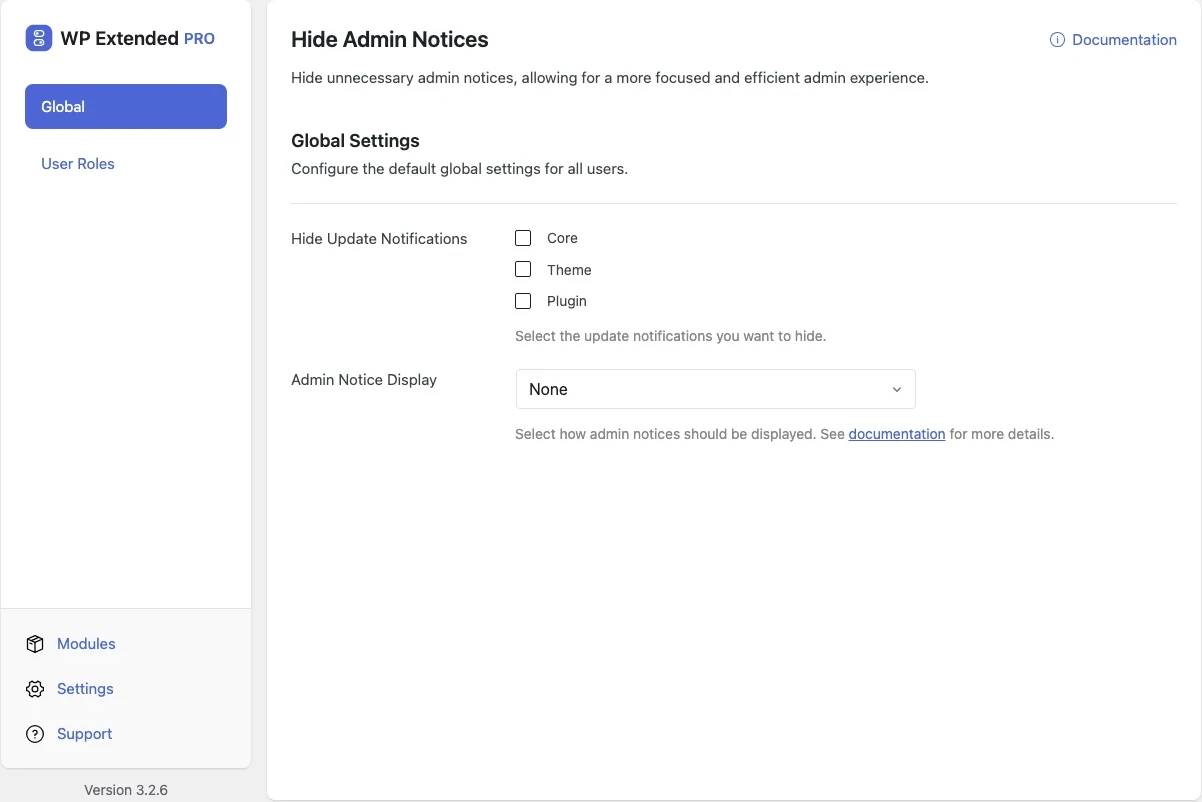
Choose how admin notices are shown, or hide them.
Update notifications
Hide the update notices you choose.
Per role
Override the global settings for a specific user role.
What you can configure
2 settings, all included with Pro.
- Hide Update Notifications Select the update notifications you want to hide.
- Select User Role Select the user role you want to configure the settings for.
Where Hide Admin Notices helps

Client admins
Editors see their work, not plugin upsells.

Agencies
Keep notices for administrators and hide them for everyone else.
Hide Admin Notices vs Disable Admin Notices
Disable Admin Notices has 100k+ active installs on WordPress.org. If you only need this one job, that’s a fine choice. If the site also needs other modules on this list, it’s one less plugin to update.
- The difference
- Hide Admin Notices does the same core job inside WP Extended, so it shares one settings screen, one update and one support team with every other module you use.
Recent changes
The latest updates to Hide Admin Notices, from the WP Extended changelog.
Full changelog- v3.4.0 3 Nov 2026
- fixed
Hiding update notices changed the stored update data [Pro].
- fixed
- v3.3.0 10 Sept 2026
- fixed
The module crashed when nothing was selected for update notifications.
- fixed
Update notices were not suppressed.
- fixed
- v3.2.0 24 Oct 2025
- fixed
Defaults not being applied to the module when no settings were changed after module activation.
- fixed
- v3.1.0 22 Sept 2025
- new
Global notification display setting.
- new
Hide Admin Notices questions
Hide Admin Notices documentationNo. It is part of WP Extended Pro.
You choose what is hidden and for whom. A common setup keeps everything visible to administrators and hides notices from editors.
Get Hide Admin Notices with WP Extended Pro
Every Pro plan includes Hide Admin Notices and the rest of the toolkit, with updates and support.
Pro from $29 a year · 14-day money-back guarantee