

Duplicate any post or page in one click
Copy a post, page or custom post type with one click from the list screen or the editor. Start new pages from a layout you already built, without copying blocks across by hand.
Free on WordPress.org. Pro adds the extra options listed below.
- with extra Pro options
- Free
- settings to configure
- 6
- developer hooks
- 16
- updates since 2024
- 16

Why you need Duplicate Posts & Pages
WordPress has no duplicate button. To reuse a page layout you copy every block into a new page, re-add the featured image, then reselect categories, tags and custom fields.
For landing pages, service pages or WooCommerce products that share a structure, that is slow and easy to get wrong.
What Duplicate Posts & Pages does
One-click duplicates
A Duplicate link appears in the row actions on posts and pages, and opens the new draft in the editor.
Choose what is copied
Pro lets you set the defaults for content, featured image, taxonomies, custom fields and menu order, and override them for each copy.
Status and title format
Copies are drafts titled “[Duplicate] {post_title}”. Pro lets you change the status, the title format and whether the editor opens on the copy.
Custom post types
Pro adds the Duplicate link to WooCommerce products and any custom post type.
Set it up
In WordPress, open WP Extended and find Duplicate Posts & Pages under Content Management.
Full setup guide- 01 Turn on Duplicate Posts & Pages under Content Management.
- 02 Hover over any post or page in the list and click Duplicate.
- 03 With Pro, choose the post types, copied elements, status and title format in the module settings.
Free and Pro options
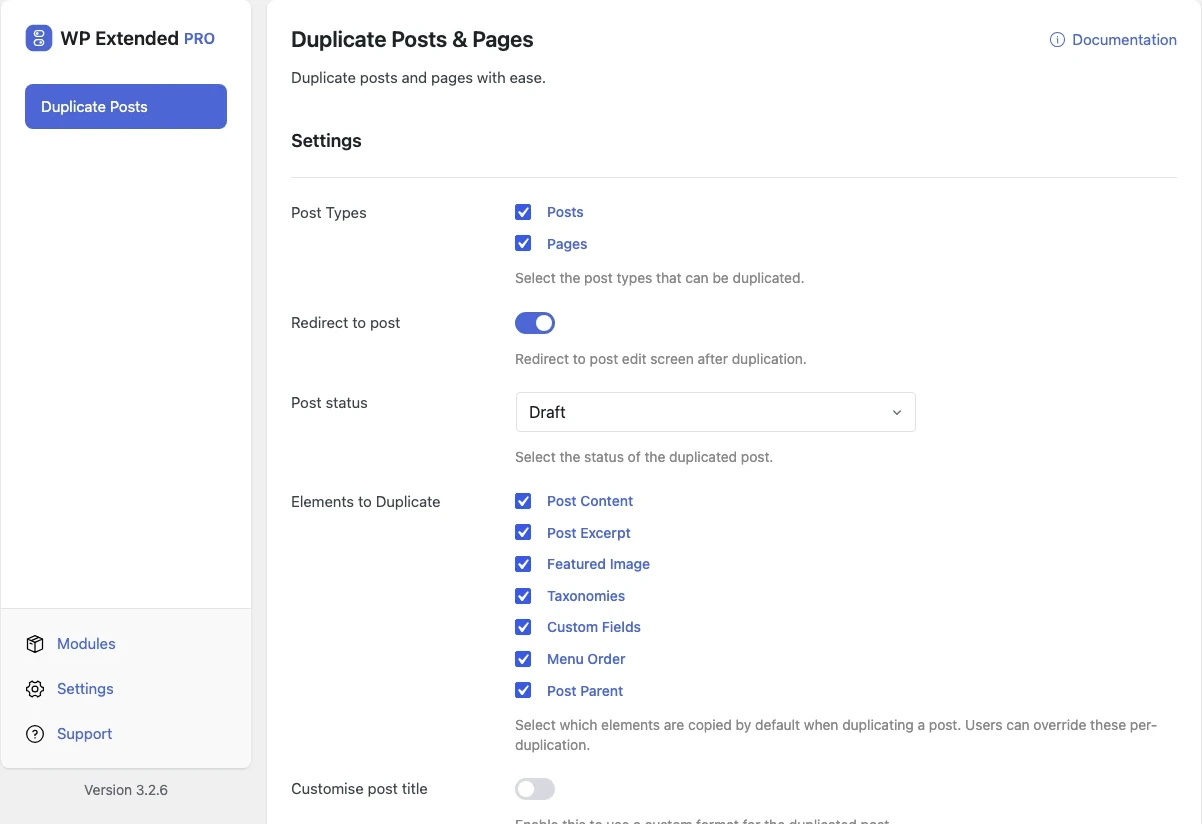
What you can set in the free plugin, and what WP Extended Pro adds.
Added by Pro Pro
- Post Types Select the post types that can be duplicated.
- Redirect to post Redirect to post edit screen after duplication.
- Post status Select the status of the duplicated post.
- Elements to Duplicate Select which elements are copied by default when duplicating a post. Users can override these per-duplication.
- Customise post title Enable this to use a custom format for the duplicated post.
- Post title format Use {post_title} to insert the original post title.
Pro options unlock on any Pro plan, from $29 a year.
Where Duplicate Posts & Pages helps

Landing page variants
Clone a tested page to build a variant for a new campaign or location.

Service and product templates
Keep one well-built page as a template and duplicate it for each new service or product.

Safe edits
Duplicate a live page, edit the copy as a draft, then swap it in when it’s ready.
Duplicate Posts & Pages vs Yoast Duplicate Post
Yoast Duplicate Post has 3M+ active installs and Duplicate Page has 3M+ active installs on WordPress.org. If you only need this one job, that’s a fine choice. If the site also needs other modules on this list, it’s one less plugin to update.
- What Duplicate Posts & Pages covers
- One-click duplicates of any post type, with control over what is copied, the new status and the title format.
- When to choose the specialist plugin
- If you need a rewrite-and-republish workflow that merges edits back into the original post, a dedicated duplication plugin offers that.
For developers
Duplicate Posts & Pages has 16 hooks for changing its behaviour per project, without editing the plugin.
All Duplicate Posts & Pages hooksadd_filter( 'wpextended/duplicate-post/allowed_meta_keys', function ( $value ) {
// Return the value you want to use
return $value;
} );- duplicate-post/after_duplicate
- duplicate-post/allowed_meta_keys
- duplicate-post/available_elements
- duplicate-post/default_elements
- duplicate-post/elements
- duplicate-post/excluded_meta
- +10 more
“Turn on what you need, leave the rest off. Duplicate posts, SMTP, rollback, custom admin URL, code snippets… stuff I used to install four or five separate plugins for. Now it’s just one with one update to run and one UI to deal with.”
Recent changes
The latest updates to Duplicate Posts & Pages, from the WP Extended changelog.
Full changelog- v3.4.0 3 Nov 2026
- improved
The editor toolbar button has been rebuilt with React.
- fixed
Breakdance content was not copied intact.
- improved
- v3.3.0 10 Sept 2026
- fixed
The module required Pro — it is free again, with its settings remaining Pro.
- fixed
Duplicating an untitled post with content deselected returned an error instead of a clear message.
- fixed
Editor scripts loaded on the Widgets screen.
- fixed
Duplicate Posts & Pages questions
Duplicate Posts & Pages documentationYes. Duplicating is free. The settings for post types, copied elements, status and title format are part of WP Extended Pro.
Yes. The copy includes the content, featured image, taxonomies, custom fields and menu order. With Pro you can choose the defaults and change them for each copy.
Posts and pages can be duplicated in the free plugin. WP Extended Pro lets you add products and any custom post type.
No. Copies are created as drafts, so nothing appears on the site until you publish it. Pro lets you choose a different status.
Get Duplicate Posts & Pages free
Duplicate Posts & Pages is in the free plugin on WordPress.org, alongside 34 other free modules you can switch on when you need them.
Pro from $29 a year · 14-day money-back guarantee