
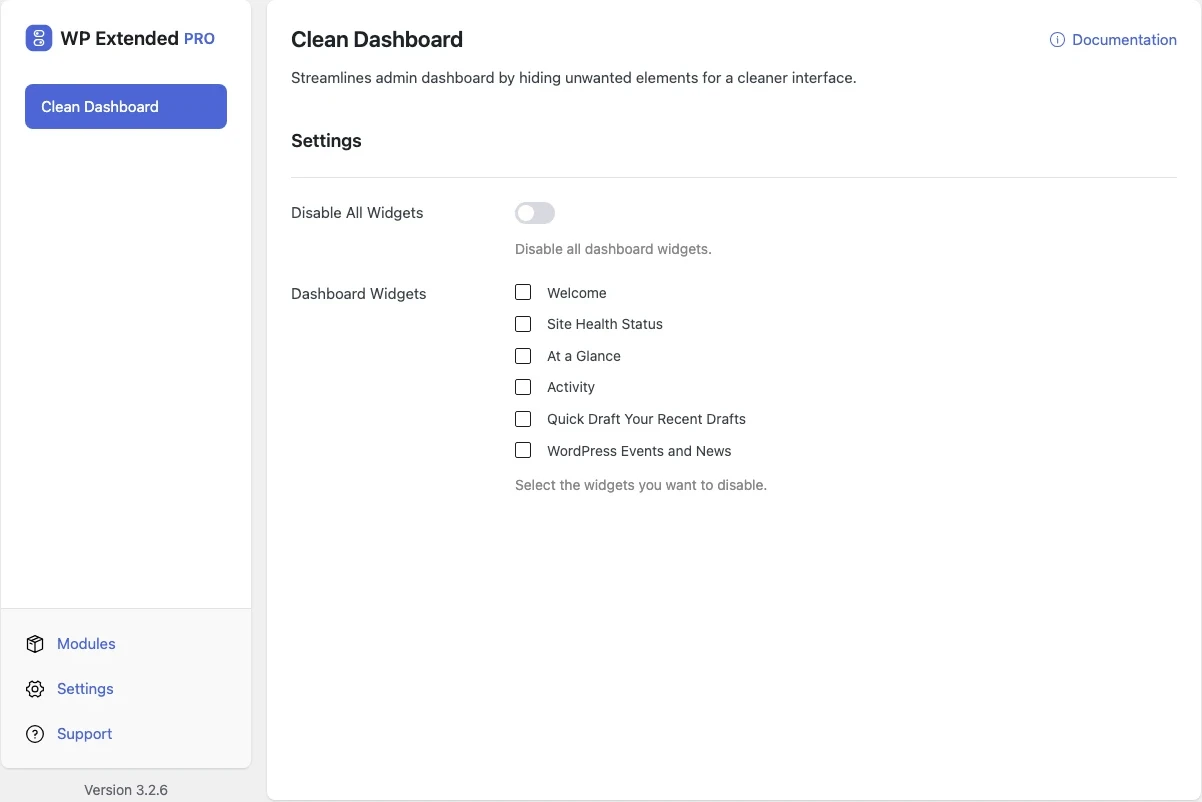
Clear the clutter from the WordPress dashboard
Remove the news feeds, plugin promos and widgets nobody reads from the dashboard, one by one or all at once.
Included in every Pro plan, alongside all the other modules.
- included in every Pro plan
- Pro
- settings to configure
- 2
- developer hooks
- 2
- last improved in
- 3.1.0

Why you need Clean Dashboard
Every plugin seems to add a dashboard widget. Clients log in to a wall of upsells and WordPress news instead of anything useful.
What Clean Dashboard does
- Pick widgets to hide Choose from every registered dashboard widget, including ones added by plugins.
- Or hide them all One switch disables every dashboard widget.
What you can configure
2 settings, all included with Pro.
- Disable All Widgets Disable all dashboard widgets.
- Dashboard Widgets Select the widgets you want to disable.
Where Clean Dashboard helps
Client handover
A calm, empty dashboard instead of plugin adverts.

Editors
Fewer distractions for people who only write content.
For developers
Clean Dashboard has 2 hooks for changing its behaviour per project, without editing the plugin.
All Clean Dashboard hooksadd_filter( 'wpextended/clean-dashboard/dashboard_widgets', function ( $value ) {
// Return the value you want to use
return $value;
} );- clean-dashboard/dashboard_widgets
- clean-dashboard/widgets_list
- v3.1.0 22 Sept 2025
- new
Toggle to disable all widgets.
- new
Clean Dashboard questions
Clean Dashboard documentationNo. It is part of WP Extended Pro.
Yes. Choose the widgets to disable and leave the rest.
Get Clean Dashboard with WP Extended Pro
Every Pro plan includes Clean Dashboard and the rest of the toolkit, with updates and support.
Pro from $29 a year · 14-day money-back guarantee