

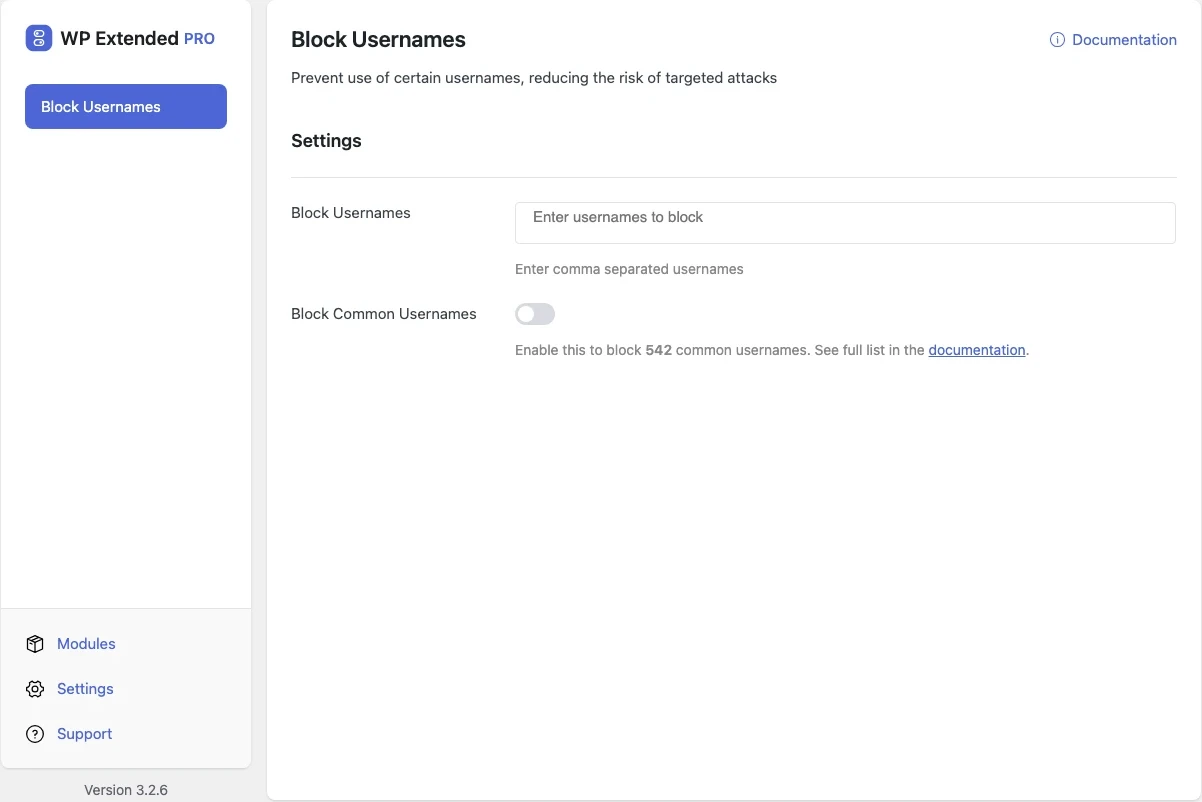
Block risky usernames like “admin”
Stop new accounts from using “admin” and “administrator”, the usernames attackers try first. Pro adds a list of common names and your own comma-separated list.
Free on WordPress.org. Pro adds the extra options listed below.
- with extra Pro options
- Free
- setting to configure
- 1
- developer hooks
- 2
- updates since 2024
- 3

Why you need Block Usernames
Bots try “admin”, “administrator” and the site name before anything else. If a real account uses one of those names, half the attacker’s work is already done.
What Block Usernames does
Admin names blocked
Registrations and profile updates using “admin” or “administrator” are refused, and you are warned about existing accounts that use them.
Common and custom lists
Pro adds a built-in list of commonly targeted names and any names you want to block.
Works with login limits
Limit Login Attempts can block attempts on these names immediately.
Free and Pro options
What you can set in the free plugin, and what WP Extended Pro adds.
Added by Pro Pro
- Block Usernames Enter comma separated usernames
Pro options unlock on any Pro plan, from $29 a year.
Where Block Usernames helps

Open registration
Membership and community sites where anyone can sign up.
Hardening checklists
One small step that removes an easy target.
For developers
Block Usernames has 2 hooks for changing its behaviour per project, without editing the plugin.
All Block Usernames hooksadd_filter( 'wpextended/block-usernames/blocked_usernames', function ( $default_usernames ) {
// Filter the list of blocked usernames. Allows other plugins or themes to modify the default list of blocked usernames.
return $default_usernames;
} );- block-usernames/blocked_usernames
- block-usernames/ignored_usernames
Block Usernames questions
Block Usernames documentationNo. It stops new accounts using blocked names and shows a notice listing existing accounts that use one, so you can change them.
The common usernames list and your own custom list. See Free vs Pro.
Get Block Usernames free
Block Usernames is in the free plugin on WordPress.org, alongside 34 other free modules you can switch on when you need them.
Pro from $29 a year · 14-day money-back guarantee