

Brand the WordPress admin and login page
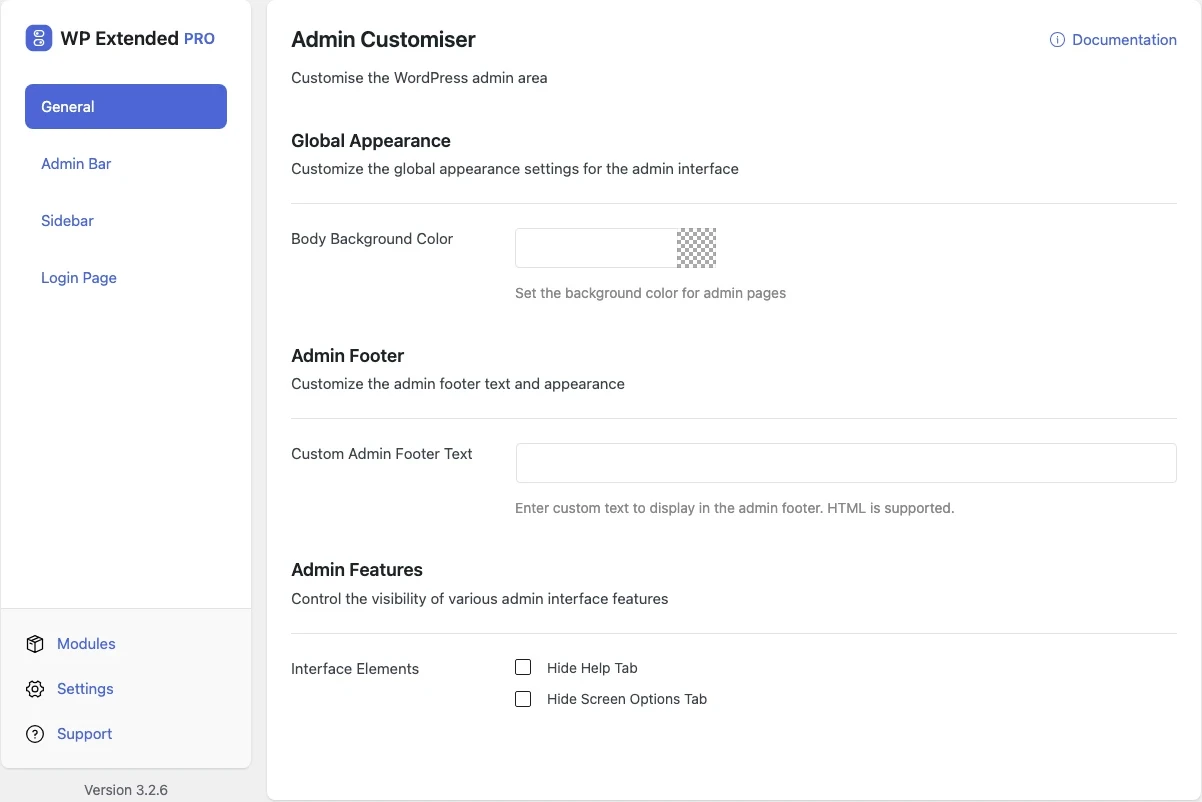
Put your own logo and colours on the admin bar, sidebar and login screen, add your footer text, and hide admin bar items clients don’t need.
Included in every Pro plan, alongside all the other modules.
- included in every Pro plan
- Pro
- settings to configure
- 28
- developer hooks
- 4
- updates since 2025
- 20
Why you need Admin Customiser
Client sites look like every other WordPress install, with the WordPress logo in the corner and the default login page. Agencies want the admin to feel like part of the product they handed over.
What Admin Customiser does
Login page
Logo, background, form colours, border radius, button colours and a custom login message.
Admin bar and sidebar
Your logo in the admin bar, colours for every state, sidebar width and the option to hide menu icons.
Footer and clutter
Custom admin footer text and a list of admin bar items to hide.
What you can configure
28 settings, all included with Pro.
- Body Background Color Set the background color for admin pages
- Custom Admin Footer Text Enter custom text to display in the admin footer. HTML is supported.
- Admin Bar Logo Upload a custom logo to replace the WordPress logo in the admin bar
- Background Color Set the background color for the top admin bar
- Text Color Set the text color for admin bar items
- Dropdown Background Color Set the background color for the dropdown menu in the admin bar
- Hover Background Color Set the background color when hovering over top-level admin bar items
- Hover Text Color Set the hover color for admin bar items
- Hide Admin Bar Elements Select which elements to hide from the admin bar
- Active Background Color Set the background color for the currently selected menu item
- Active Text Color Set the text color for the currently selected menu item
- Icon Color Set the color for icons in the sidebar menu
- Hide Sidebar Icons Remove icons from the sidebar menu items
- Sidebar Width Adjust the width of the admin sidebar. Default: 160px
- Login Page Logo Upload a custom logo to replace the WordPress logo on the login page
- Login Page Background Set the background color for the login page
- Login Page Text Set the text color for the login page content
- Form Background Color Set the background color for the login form section
- Form Text Color Set the text color for form labels and messages
- Form Text Hover Color Set the hover and focus color for form links and inputs
- Form Border Color Set the border color for the login form section
- Form Border Radius Set the border radius for the login form section. Default: 4px
- Input Background Color Set the background color for input fields
- Input Text Color Set the text color for input fields
- Login Button Background Set the background color for the login button
- Login Button Text Set the text color for the login button
- Form Options Select additional options for the login form
- Custom Login Message Add a custom message to the login page
Where Admin Customiser helps

Agency white labelling
Hand over a branded admin with your agency’s or the client’s logo.

Membership logins
Match the login page to the site so members don’t see a generic WordPress screen.
Admin Customiser vs White Label CMS
White Label CMS has 200k+ active installs on WordPress.org. If you only need this one job, that’s a fine choice. If the site also needs other modules on this list, it’s one less plugin to update.
- The difference
- Admin Customiser does the same core job inside WP Extended, so it shares one settings screen, one update and one support team with every other module you use.
For developers
Admin Customiser has 4 hooks for changing its behaviour per project, without editing the plugin.
All Admin Customiser hooksadd_filter( 'wpextended/admin-customiser/admin_bar_variables', function ( $value ) {
// Return the value you want to use
return $value;
} );- admin-customiser/admin_bar_variables
- admin-customiser/css_variables
- admin-customiser/login_variables
- admin-customiser/sidebar_variables
- v3.4.0 3 Nov 2026
- fixed
Custom login page and admin bar logos did not appear [Pro].
- fixed
The login page showed a broken logo after its image was deleted [Pro].
- fixed
- v3.3.0 10 Sept 2026
- fixed
Colour settings were not escaped on the login page.
- fixed
- v3.2.7 21 Jun 2026
- added
New “Item Hover Background Colour” setting for admin bar items.
- improved
Now defers to each user’s WordPress admin colour scheme — custom colours only apply where explicitly set.
- added
Admin Customiser questions
Admin Customiser documentationNo. It is part of WP Extended Pro.
No. Custom colours only apply where you set them, and everything else follows each user’s chosen WordPress colour scheme.
Get Admin Customiser with WP Extended Pro
Every Pro plan includes Admin Customiser and the rest of the toolkit, with updates and support.
Pro from $29 a year · 14-day money-back guarantee