
Show the columns your team needs in WordPress lists
Add custom fields, thumbnails and dates to the post, page, media, comment and user lists, and remove the columns nobody uses. Editors find what they need without opening each item.
Included in every Pro plan, alongside all the other modules.
- included in every Pro plan
- Pro
- settings to configure
- 8
- developer hooks
- 15
- updates since 2025
- 4

Why you need Admin Columns
WordPress list screens show the same few columns on every site. The information an editor actually needs, like a custom field, an event date or a product code, is hidden inside each item.
Teams end up opening record after record to check one value.
What Admin Columns does
Every list screen
Configure columns for posts, pages, custom post types, media, comments and users.
Custom field columns
Choose a data source and meta key to show any custom field as a column.
Rename and hide
Change column titles, and disable built-in columns you don’t need.
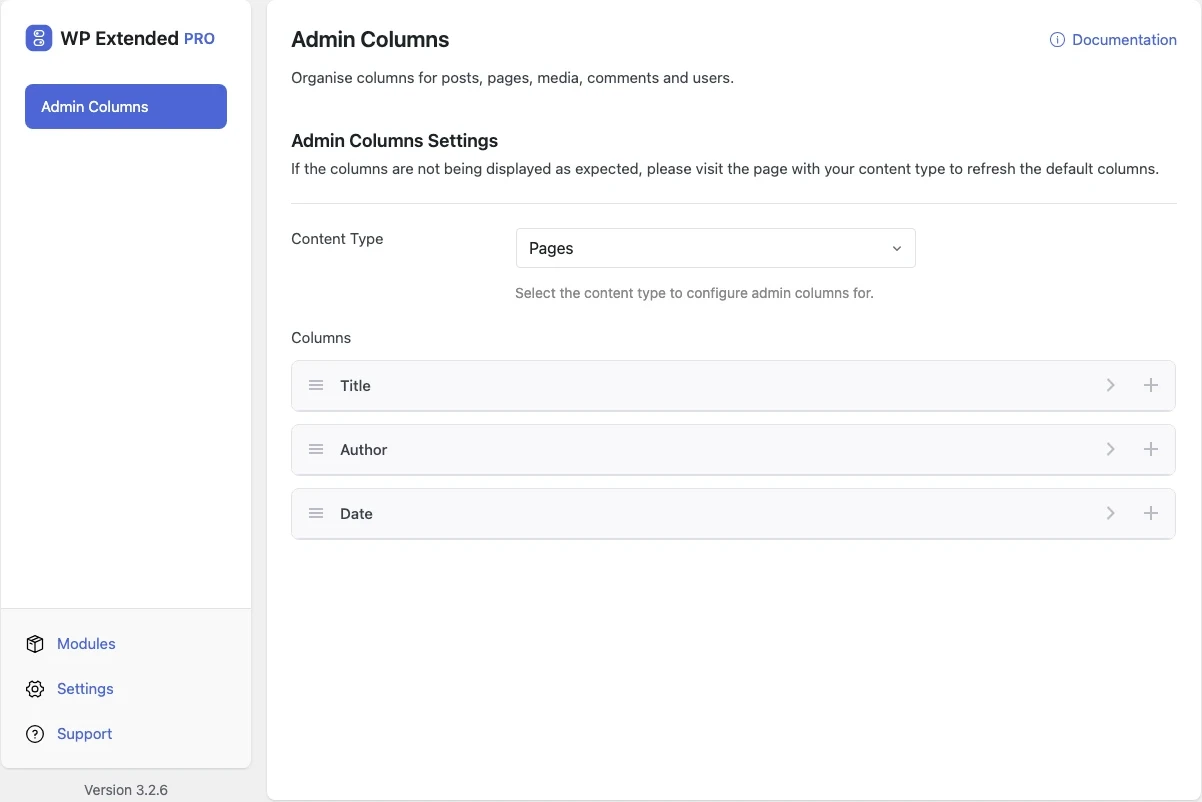
- 01 Turn on Admin Columns under Admin Tools.
- 02 Choose a content type, such as Posts or Users.
- 03 Add a column, give it a title, choose the data source and meta key, then save.
What you can configure
8 settings, all included with Pro.
- Content Type Select the content type to configure admin columns for.
- User Columns Add custom columns for users admin list.
- Comment Columns Add custom columns for the comments admin list.
- Column Label The label/key for this column.
- Column Title The title displayed in the column header.
- Data Source Select the data source for this column.
- Meta Key Select the meta key to retrieve
- Disable Column Check to disable this column.
Where Admin Columns helps

Events and listings
Show event dates, locations or prices right in the list.

Membership sites
Add plan or status columns to the Users screen.

Editorial teams
Show the fields editors check every day, such as reviewer or publish region.
WP Extended vs the Admin Columns plugin
The Admin Columns plugin has 100k+ active installs on WordPress.org. If you only need this one job, that’s a fine choice. If the site also needs other modules on this list, it’s one less plugin to update.
- What Admin Columns covers
- Custom and renamed columns, including custom fields, on posts, custom post types, media, comments and users.
- When to choose the specialist plugin
- If you need inline editing, filtering and exports from list screens, a dedicated admin columns plugin goes further.
For developers
Admin Columns has 15 hooks for changing its behaviour per project, without editing the plugin.
All Admin Columns hooksadd_filter( 'wpextended/admin-columns/all_available_columns', function ( $value ) {
// Return the value you want to use
return $value;
} );- admin-columns/all_available_columns
- admin-columns/available_post_types
- admin-columns/columns
- admin-columns/comment_columns
- admin-columns/extra_columns
- admin-columns/handle_column
- +9 more
- v3.4.1 4 Nov 2026
- fixed
The settings screen no longer fails to load (“The server returned an unexpected response”) on sites where a post type’s list screen had not been opened since the module was turned on [Pro].
- fixed
- v3.3.0 10 Sept 2026
- fixed
A custom meta column did not escape its value.
- fixed
- v3.1.1 26 Sept 2025
- fixed
Issue with the migration of custom columns.
- fixed
Meta field columns that were arrays caused a fatal error when trying to be output.
- fixed
Admin Columns questions
Admin Columns documentationNo. Admin Columns is part of WP Extended Pro, from $29 a year for one site.
Yes. Choose the meta key that stores the field and it appears as a column.
Yes. Users and comments have their own column settings.
For adding, renaming and hiding columns, yes, and it comes with 50 other modules in one plugin. Admin Columns Pro goes further with inline editing, filtering and exports, so pick it if your team edits data from list screens. See our guide to custom admin columns.
Get Admin Columns with WP Extended Pro
Every Pro plan includes Admin Columns and the rest of the toolkit, with updates and support.
Pro from $29 a year · 14-day money-back guarantee